
Trusted by
7 Million
People Each Year!
Learn typing fast.
Reach 50 words
per minute!


For Windows 11/10/8/7 · Version 12.01.973 · 12 MB Installer
Here's What You Get
1.
Improve typing speed with lessons that focus on your weakest keys.
2.
Start a free 1-week typing course. No account, no credit card required.
3.
Works offline on your PC. Your progress stays stored locally.
What Our Customers Are Saying
★★★★★
4.4 stars ·
2,731 ratings on Microsoft Store
Read Customer Reviews of TypingMaster 12. See Why Users Love Us!
Easy to Use Typing Tutor
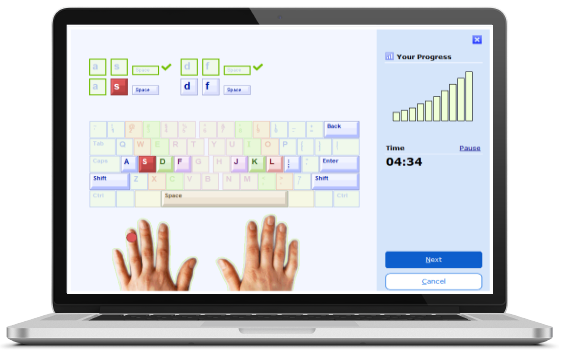
TypingMaster 12 is a touch typing tutor that adapts to your unique needs, featuring both training and an advanced typing test. Enjoy over 10 hours of customized exercises that guide you step by step to professional-level keyboarding. As a result, your typing speed is likely to double — or even triple — and you will save hours and hours of valuable working time.
Training is adjusted to your personal progress every step of the way. TypingMaster pinpoints your weak spots and eliminates them with personalized exercises. Thanks to this dynamic approach your new skill is ready for action after 3 to 5 hours of training.
Supports standard and international keyboard layouts including QWERTY, AZERTY, QWERTZ, Colemak and Dvorak. Training is available in 10 languages: English, Hindi, French, Spanish, Portuguese, etc.
Download now
Training is adjusted to your personal progress every step of the way. TypingMaster pinpoints your weak spots and eliminates them with personalized exercises. Thanks to this dynamic approach your new skill is ready for action after 3 to 5 hours of training.
Supports standard and international keyboard layouts including QWERTY, AZERTY, QWERTZ, Colemak and Dvorak. Training is available in 10 languages: English, Hindi, French, Spanish, Portuguese, etc.


Your Personal Typing Coach — Always in the Background
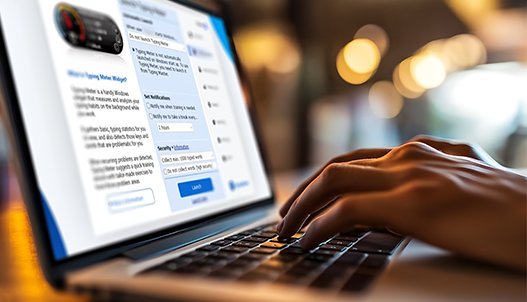
TypingMeter is a lightweight desktop widget that quietly notices how you type while you go about your normal work — emails, reports, chats — and turns that into useful feedback. All data stays on your PC.
Instead of guessing what to practice next, TypingMeter spots the individual keys and key-pair combinations (bigrams) that cause hesitation, then builds targeted drills around exactly those patterns. Occasionally it will surface a short suggested drill based on what it has observed — so your practice time stays focused on what actually needs work.
Download Free Course
Instead of guessing what to practice next, TypingMeter spots the individual keys and key-pair combinations (bigrams) that cause hesitation, then builds targeted drills around exactly those patterns. Occasionally it will surface a short suggested drill based on what it has observed — so your practice time stays focused on what actually needs work.


Advanced Typing Test Platform
Sharpen your typing skills with advanced tests that measure WPM, accuracy, and automatically flag difficult keys. After each test, a detailed report pinpoints mistakes, and the Custom Review feature can create targeted text drills or gamified drills for your specific problem keys to help you improve faster.
Choose test durations from 1 to 60 minutes and repeat anytime to track progress. Upgrade to Premium to create custom tests with your own text for targeted training.
Download now
Choose test durations from 1 to 60 minutes and repeat anytime to track progress. Upgrade to Premium to create custom tests with your own text for targeted training.
Printable Typing Certificate
Upon completing the typing tests, you'll be able to print out a diploma or certificate to acknowledge your progress and achievements. The certificate serves as a great way to celebrate your dedication and improvement in typing speed and accuracy.
While you train, TypingMaster detects any problematic fingers or keys that need extra practice. It then creates custom exercises to address those specific areas, helping you target and improve your weaknesses.
Additionally, advanced TypingMeter statistics allow you to track your typing progress in detail, showing how much you've typed and how your WPM speed improves over days and weeks. If recurring issues are detected, TypingMeter will suggest targeted training sessions to help you overcome those challenges. Over time, you'll eliminate the pain points that slow you down, making it easier to perfect your typing skills.
Download now
While you train, TypingMaster detects any problematic fingers or keys that need extra practice. It then creates custom exercises to address those specific areas, helping you target and improve your weaknesses.
Additionally, advanced TypingMeter statistics allow you to track your typing progress in detail, showing how much you've typed and how your WPM speed improves over days and weeks. If recurring issues are detected, TypingMeter will suggest targeted training sessions to help you overcome those challenges. Over time, you'll eliminate the pain points that slow you down, making it easier to perfect your typing skills.
*) Try before you buy! Download the free 1-week typing tutor with all features. After 7 days, some features will be limited. Free charity licenses available for schools and learners in developing nations.